Skip to content
Promotion Vault Customer Center
Getting Started

Add some funds

{{ hit.title }} {{ hit.cat }}
No articles match that search. Try a different word.

There are different ways to fund your account:

Add funds directly to a credit card or bank account payment on file
Create an invoice to be funded at a later date

Add Funds
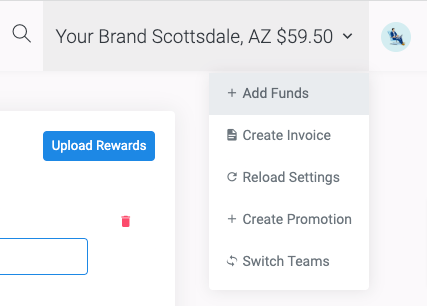
The add funds dialog
1From the team dashboard click add funds
2Use the default payment method or select a different method listed

Reload Settings

Setup reload settings so there are always funds in the team account and to ensure your team is never out of funds. Reload settings can be updated anytime from the payment method page.
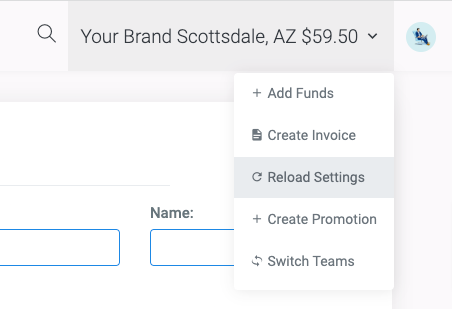
Reload settings

Account Balance

After adding funds into your team(s) to use for sending rewards. You can see your available balance:
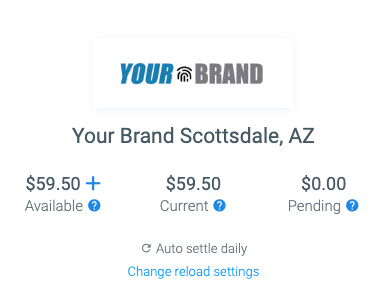
Account balance in the dashboard
1In the Dashboard.
2In the Transactions table
3In the Payment Methods
Did this article solve your problem?
{{ voteNote }}

More in Getting Started

Setting up a team Add your payment method Create your first promotion Add your first reward

Add some funds

No articles match that search. Try a different word.

There are different ways to fund your account:

Add funds directly to a credit card or bank account payment on file
Create an invoice to be funded at a later date

Add Funds

The add funds dialog
1From the team dashboard click add funds
2Use the default payment method or select a different method listed

Reload Settings

Setup reload settings so there are always funds in the team account and to ensure your team is never out of funds. Reload settings can be updated anytime from the payment method page.

Reload settings

Account Balance

After adding funds into your team(s) to use for sending rewards. You can see your available balance:

Account balance in the dashboard
1In the Dashboard.
2In the Transactions table
3In the Payment Methods
Did this article solve your problem?

More in Getting Started