Skip to content
Promotion Vault Customer Center
Advanced tools

Managing your account balance

{{ hit.title }} {{ hit.cat }}
No articles match that search. Try a different word.

If you haven’t already done so, add a payment method. To ensure the best reward experience setup reload settings or create an invoice to have your accounts payable department settle.

How do I create an invoice?
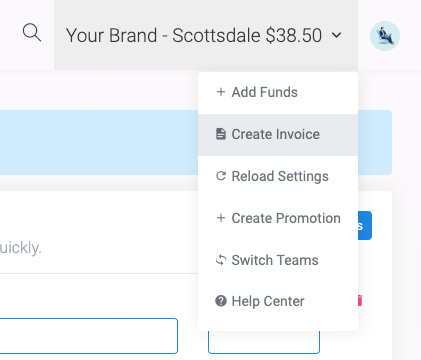
Creating an invoice
1From the team dashboard click Create Invoice.
2Select the amount then select Wire Invoice, Credit Card Invoice or ACH Transfer Invoice and add funds.
3The invoice will be in the Transaction tab for you to download and send to your team.
Note: Once an invoice is created or settled it can always be downloaded from the transaction table. Simply filter by invoice in the Filter by Type status and all invoices will appear in the table.

Your transaction history

Access any historical transactions from the transactions table. Learn how to filter the transaction table and find the data you are looking for.
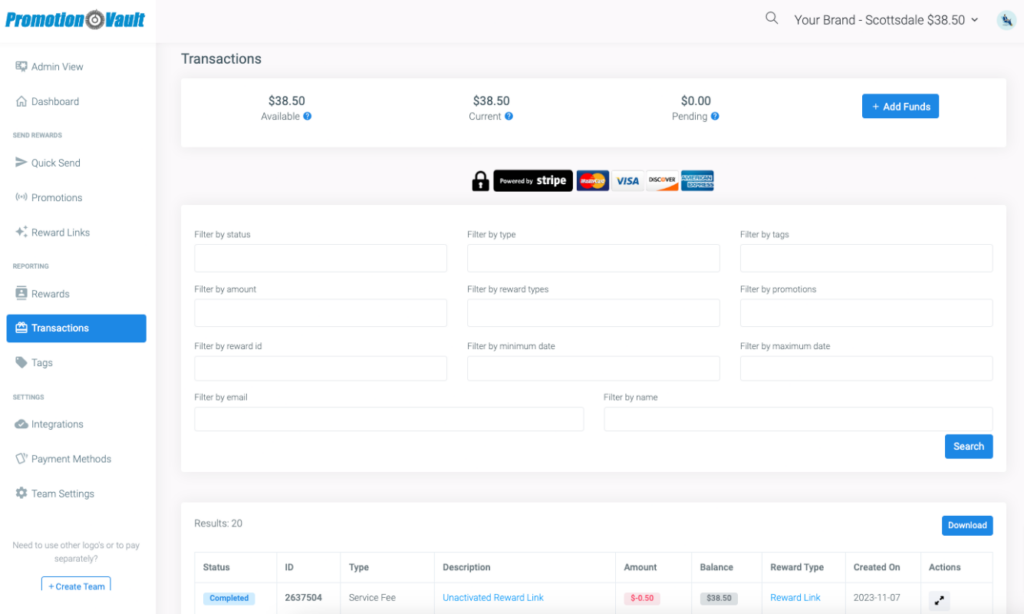
The transactions table

From the transaction table you can segment the data by status, type, tags, amount, reward types, promotions, reward id, begin date or end date for all transactions. Any data can always be downloaded.

Did this article solve your problem?
{{ voteNote }}

More in Advanced tools

Managing teams Additional Reward Settings Manage your Rewards Manage your Promotions

Managing your account balance

No articles match that search. Try a different word.

If you haven’t already done so, add a payment method. To ensure the best reward experience setup reload settings or create an invoice to have your accounts payable department settle.

How do I create an invoice?

Creating an invoice
1From the team dashboard click Create Invoice.
2Select the amount then select Wire Invoice, Credit Card Invoice or ACH Transfer Invoice and add funds.
3The invoice will be in the Transaction tab for you to download and send to your team.
Note: Once an invoice is created or settled it can always be downloaded from the transaction table. Simply filter by invoice in the Filter by Type status and all invoices will appear in the table.

Your transaction history

Access any historical transactions from the transactions table. Learn how to filter the transaction table and find the data you are looking for.

The transactions table

From the transaction table you can segment the data by status, type, tags, amount, reward types, promotions, reward id, begin date or end date for all transactions. Any data can always be downloaded.

Did this article solve your problem?

More in Advanced tools