Skip to content
Promotion Vault Customer Center
Advanced tools

Manage your Rewards

{{ hit.title }} {{ hit.cat }}
No articles match that search. Try a different word.

After any reward is sent you can view the status in the Rewards Tab. Additionally, you can resend the last email, activate the reward, delete the reward or send another reward right from the Actions column!
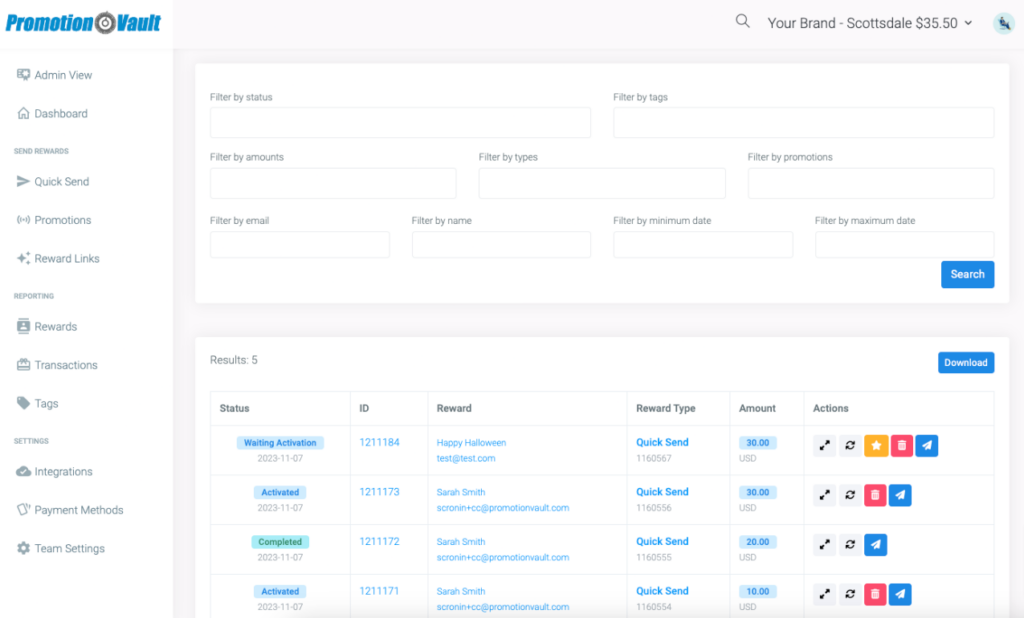
The Rewards tab

Similar to the transaction table you can segment the data by status, tags, amount, reward types, promotions, email, name, begin date or end date for all rewards. Any data can always be downloaded.

Did this article solve your problem?
{{ voteNote }}

More in Advanced tools

Managing teams Managing your account balance Additional Reward Settings Manage your Promotions

Manage your Rewards

No articles match that search. Try a different word.

After any reward is sent you can view the status in the Rewards Tab. Additionally, you can resend the last email, activate the reward, delete the reward or send another reward right from the Actions column!

The Rewards tab

Similar to the transaction table you can segment the data by status, tags, amount, reward types, promotions, email, name, begin date or end date for all rewards. Any data can always be downloaded.

Did this article solve your problem?

More in Advanced tools